Home Sweet Home
Software & Games
Main page / Главна страница
Release history:
2026-11-01 — Digital Releaser — v1.60
2026-09-06 — Master Chef Cook Timer — v2.14
2026-09-01 — IMDb Movie Randomizer — v1.00
2026-09-01 — DreamBook — v1.00
2026-08-01 — Digital Releaser — v1.50
2026-07-01 — Mini Multi-Tool — v3.00
2026-06-24 — Updated Subtitle Line Joiner and Super Subtitle Fixer
screenshots to the last version
2026-05-01 — Digital Releaser — v1.20 (First Public Release)
2026-05-01 — Subtitle Line Joiner — v3.30
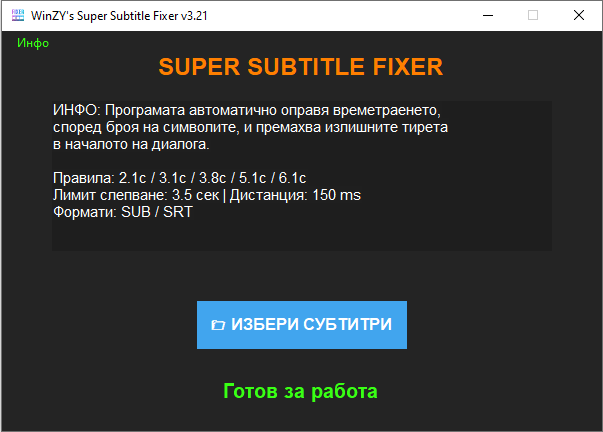
2026-05-01 — Super Subtitle Fixer — v3.21
2026-03-27 — Master Chef Cook Timer — v2.13a
2026-03-16 — Deal Or No Deal — v2.1 (BG)
Download
Latest version: v3.30
⬇ Download NowОписание (BG)
🇧🇬 WinZY's Subs Line Joiner – Твоят инструмент за перфектни субтитри!
Омръзна ли ти от субтитри, в които всеки ред е прекалено кратък и накъсан? Subs Line Joiner е мощно и елегантно решение, създадено специално за фенове на киното и преводачи!
🚀 Какво прави програмата?
Интелигентно слива два последователни кратки реда в един общ блок от два реда. Край на досадното премигване на текст!
✨ Топ функции и прецизен контрол:
• Пълен контрол на времето: Ти определяш максималната продължителност на новия слят ред (напр. 5.1 сек.). Ако двата реда заедно надвишават това време, програмата няма да ги слее, за да не станат трудни за четене!
• Интелигентен интервал: Сливането се активира само ако разстоянието (gap) между двата реда е до 0.5 секунди – идеално за плавен диалог!
• Shortcut Drop: Просто хвърли файловете върху иконата на програмата и тя ще ги обработи мигновено!
• Drag & Drop: Влачи и пускай файлове директно в отворения прозорец.
• Multi-Format: Пълна поддръжка на .srt, .ass и .sub (с автоматично коригиране на FPS).
Instructions (EN)
🇺🇸 WinZY's Subs Line Joiner – The Ultimate Subtitle Power-Tool!
Tired of fragmented subtitles with lines that are way too short? Subs Line Joiner is a sleek, high-performance tool designed for movie enthusiasts and sub-editors!
🚀 What does it do?
It intelligently merges two consecutive short lines into a single, clean two-line block. No more annoying text flickering!
✨ Key Features & Precision Control:
• Custom Duration Limit: You decide the max duration (e.g., 5.1 sec).
• If the combined lines exceed this limit, the program won't join them, keeping your subs readable!
• Smart Gap Detection: Lines are joined only if the gap between them is within 0.5 seconds – perfect for smooth natural dialogue!
• Shortcut Drop: Simply drop your files onto the program icon, and it processes them instantly!
• Drag & Drop: Fully supported file dropping directly into the app window.
• Multi-Format Support: Works perfectly with .srt, .sub, and .ass (including FPS header fixes).
• The Smart "JJ" Rule: The only tool that knows when a single person is speaking! If the first line starts with an uppercase and the second with a lowercase – boom, they merge using your custom marker!
• Total Limit Control: You decide the duration of the lines and the character threshold for the "Short Mode."
Features
- Automatic line merging based on timing and text length
- Supports SRT / SUB / ASS
- UTF-8 and Windows-1251 output
- Drag & Drop support
- Portable
Screenshots
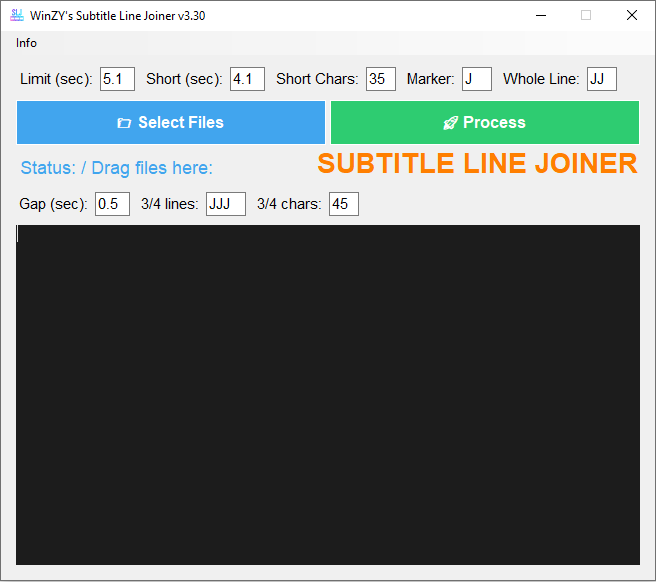 (EN)
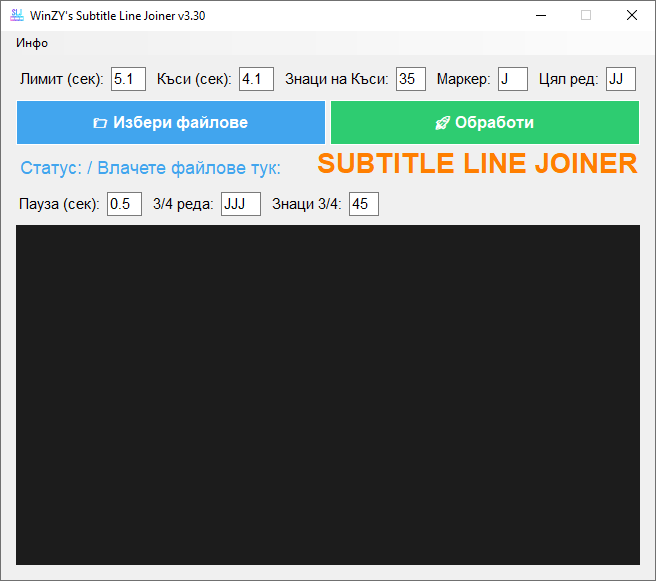 (BG)
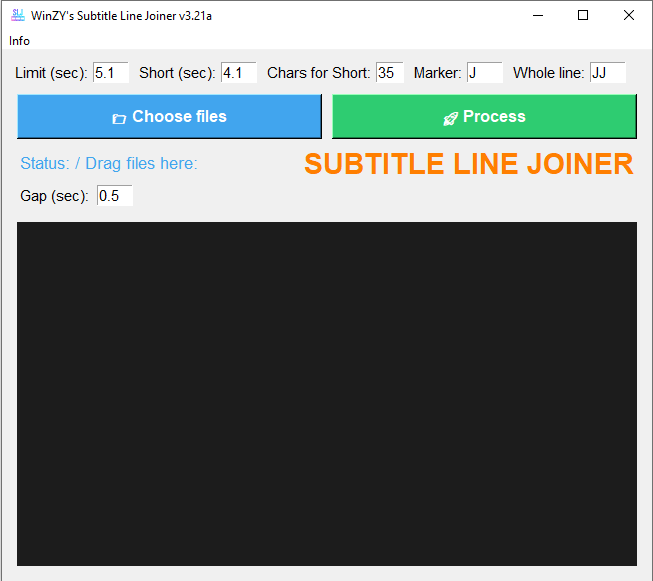 EN Python Version
Contact
Email: Moriya123@protonmail.com | YouTube: @3 Stars
Download
Latest version: v3.21
⬇ Download NowОписание (BG)
🇧🇬 Писнало ти е от „счупени“ субтитри?
Лош тайминг, редове, които изчезват твърде бързо, или досадни тирета, които развалят изживяването? Кажи „сбогом“ на проблемите!
WinZY's SUPER SUBTITLE FIXER е тук, за да вдъхне нов живот на твоите филми. Вече с модерен графичен интерфейс и светкавична скорост!
🚀 КАКВО ПРАВИ ТАЗИ ПРОГРАМА?
• Интелигентен Тайминг: Автоматично изчислява идеалното време за престой на всеки ред според броя на символите. Край на бързането да прочетеш текста!
• Диалогов „Детокс“: Премахва излишните и грозни тирета в началото на диалозите за по-чист и професионален вид.
• Масова обработка: Защо да губиш време? Маркирай цял сезон на сериал и ги оправи всички наведнъж с един клик!
• Пълна съвместимост: Работи перфектно с SRT и SUB формати.
WinZY's SUPER SUBTITLE FIXER – Защото твоето кино заслужава перфектни субтитри!
Instructions (EN)
🇺🇸 Tired of "broken" subtitles?
Poor timing, lines that disappear too fast, or annoying dashes ruining the vibe?
Say goodbye to the mess!
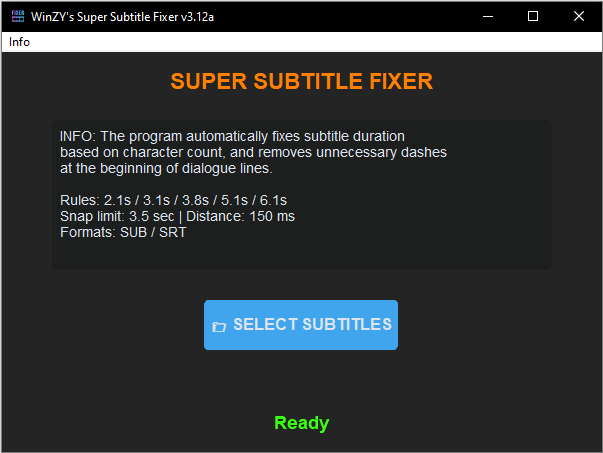
WinZY's Super Subtitle Fixer is here to breathe new life into your subtitles.
Now with a sleek modern GUI and lightning-fast performance!
🚀 WHAT’S UNDER THE HOOD?
• Smart Timing: Automatically calculates the perfect duration for every line based on character count.
No more racing to finish a sentence!
• Dialogue "Detox": Strips away unnecessary dashes from the start of lines for a cleaner, cinematic look.
• Batch Processing: Why waste time? Select a whole TV show season and fix it all at once with a single click!
• Format Support: Works flawlessly with both SRT and SUB files.
• Sexy Orange UI: A fresh, neon-vibe interface that looks absolutely stunning on dark mode.
• Real-time Stats: See exactly how many lines were extended and how many dashes were fixed.
• Saves in UTF‑8 and Windows‑1251 for full compatibility
• Drag & Drop support
• Portable
• 100% Freeware — no ads, no subscriptions
Perfect for translators, editors, fansub groups, and anyone who wants
professional‑quality subtitles without manual editing.
Lightweight, fast, and completely free!
WinZY's Super Subtitle Fixer – Give your movies the subtitles they deserve!
Features
- Supports SRT / SUB
- UTF-8 and Windows-1251 output
- Drag & Drop support
- Portable
Screenshots
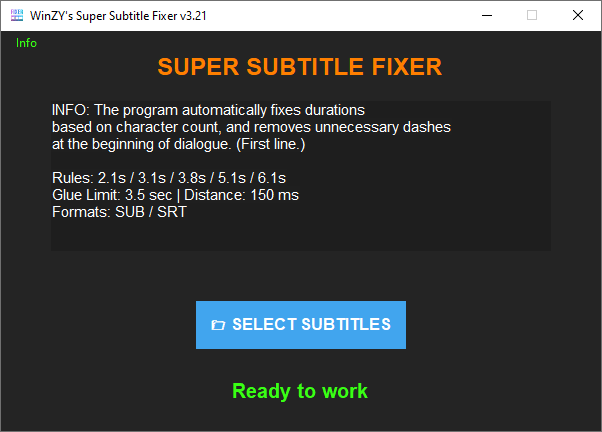 (EN)
 (BG)
 EN Python Version
Contact
Email: Moriya123@protonmail.com | YouTube: @3 Stars
Download
Latest version: v2.14
⬇ Download NowОписание (BG)
🌟 Вдигнете нивото в кухнята с най-добрия кулинарен асистент!
Независимо дали варите деликатен сос или печете празнична пуйка, Master Chef Cook Timer гарантира перфектни резултати чрез прецизност и интелигентни технологии.
✨ Екстри и възможности:
• Логика с двоен таймер: Управлявайте Общото време за готвене и същевременно следете Интервалите за бъркане. Никога повече загоряла храна!
• Интелигентно възстановяване: 🛡️ Максимална сигурност. При срив на системата, рестарт или спиране на тока, таймерът автоматично се възобновява точно оттам, където е спрял.
• Глобална езикова поддръжка: Напълно преведен на 16 езика (Български, Английски, Руски, Немски, Френски, Италиански и др.).
• Интеграция в системния трей: Стартирайте програмата във фонов режим. Посочете иконата до часовника, за да видите оставащото време, без да отваряте прозореца.
• Персонализирани аларми: Изберете продължителност на сигнала (10, 20, 30 сек.) или активирайте Постоянен звън за най-критичните моменти.
• Автоматично рестартиране: Настройте интервала за бъркане или общия таймер да се повтарят автоматично – идеално за циклични задачи.
• Бърз старт: Стартирайте стандартни таймери (3, 5, 10, 15 мин.) само с два клика или задайте свое собствено време за бърз достъп.
📝 Инструкции за употреба:
• Настройка на времето: Кликнете върху полето "Общо време". Въведете продължителността (ЧЧ:ММ:СС).
• Интервал за бъркане (Опционално): Въведете през колко време искате напомняне за разбъркване.
• Старт: Натиснете бутона СТАРТ. Лентата за напредък и часовникът ще започнат отброяването.
• Спиране на алармата: Когато чуете сигнала, натиснете големия оранжев бутон СПРИ АЛАРМАТА.
• Мултитаскинг: Минимизирайте приложението в системния трей, за да не пречи на екрана ви. Погледнете иконата за бърза справка.
• Персонализация: Използвайте менюто Настройки, за да смените езика, да включите предупрежденията при изход или да обърнете посоката на лентата за напредък.
Instructions (EN)
🌟 Elevate your culinary game with the ultimate kitchen companion!
Whether you are simmering a delicate sauce or roasting a complex feast, the Master Chef Cook Timer ensures perfection through precision and smart technology.
✨ Premium Features (Extras):
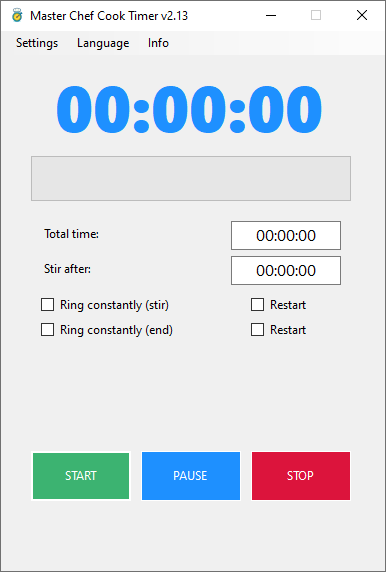
• Dual-Timer Logic: Manage your Total Cooking Time while simultaneously tracking Stir Intervals. Never burn a meal again!
• Smart Recovery System: 🛡️ Industry-leading safety. If your computer crashes, restarts, or loses power, the timer automatically resumes exactly where it left off.
• Global Language Support: Fully localized in 16 languages (English, Bulgarian, Russian, German, French, Italian, and more).
• System Tray Integration: Run the app in the background. Hover over the icon in the tray to see live remaining time without opening the window.
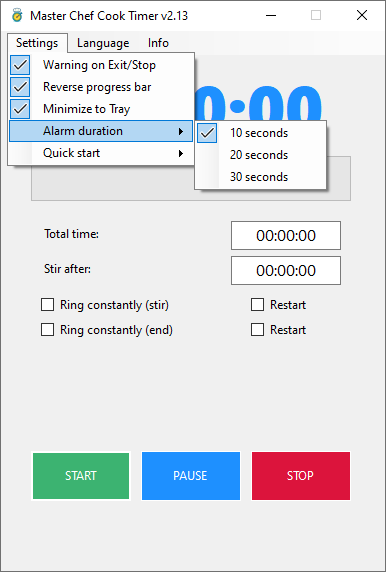
• Customizable Alarms: Choose your alert duration (10, 20, 30 sec) or set it to Continuous Mode for those critical moments.
• Auto-Restart Options: Set the stir interval or the total timer to loop automatically—perfect for repetitive cooking tasks.
• Quick Start Presets: Launch common timers (3, 5, 10, 15 min) with just two clicks or set your own custom quick-launch time.
📝 User Instructions:
• Set the Time: Click on the "Total Time" box. Type the duration (HH:MM:SS).
• Stir Interval (Optional): Enter how often you need to stir or check the dish.
• Start: Hit START. The progress bar and clock will begin their countdown.
• Managing Alarms: When the alarm rings, click the large orange STOP ALARM button.
• Multi-tasking: Minimize the app to the System Tray to keep your workspace clean. Hover over the tray icon for a quick status check.
• Customization: Use the Settings menu to change languages, toggle exit warnings, or flip the progress bar direction.
Features
- Feature one
- Feature two
- Feature three
- Supports Windows 10/11
Screenshots
 Screen EN 1
 Screen EN 2
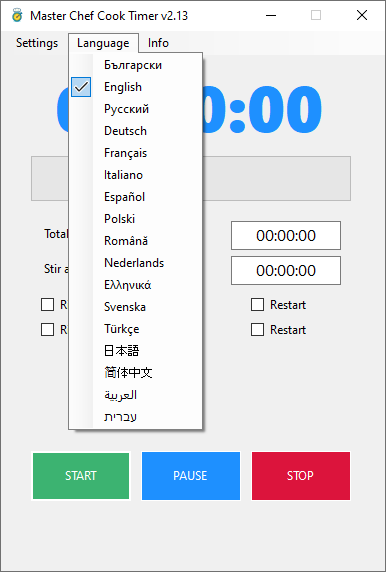 Screen EN 3
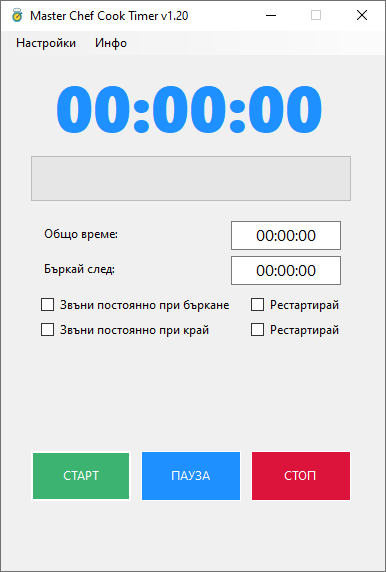 Снимка BG
Contact
Email: Moriya123@protonmail.com | YouTube: @3 Stars
Download
Latest version: v3.00
⬇ Download NowОписание (BG)
• Mini Multi-Tool v3.00 е универсално софтуерно приложение за Windows, което обединява в себе си множество полезни инструменти за управление на файлове, изчисления и системни функции в един компактен интерфейс.
• Основни модули и функции:
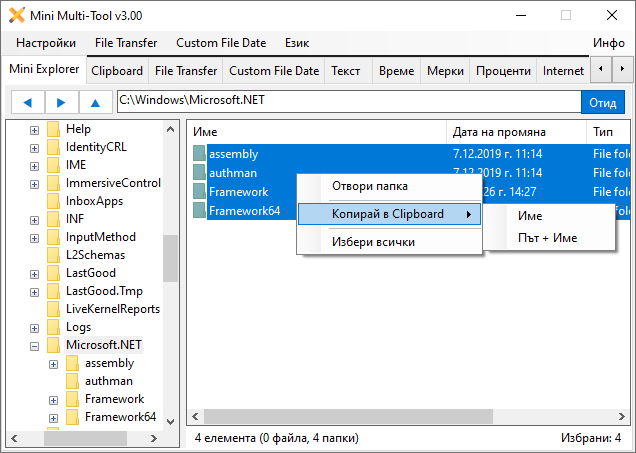
• 1. Mini Explorer (Мини Експлорер): Вграден файлов браузър, подобен на Windows Explorer. Позволява навигация по дисковете, история на посетените папки (напред/назад), управление на любими папки (Desktop, Downloads и др.) и системни контекстни менюта.
- Копиране на имена: С един клик можете да копирате само имената на избраните файлове/папки (без пътя).
- Копиране на пълни пътища: Възможност за копиране на абсолютния път до файла заедно с името му (Path + Name).
• 2. File Transfer (Трансфер на файлове): Разширен инструмент за копиране и преместване на файлове. Поддържа опашка от задачи, пауза и възобновяване, следене на скоростта в реално време (MB/s) и опция за запазване на оригиналните дата и час на файловете и папките.
• 3. Custom File Date (Промяна дата на файл): Мощен инструмент за масова промяна на времевите отпечатъци на файлове и папки (дата на създаване, модификация и достъп). Поддържа промяна на **EXIF метаданни** за JPEG снимки и позволява филтриране по разширение (функция "Не променяй").
• 4. Clipboard Logger (Лог на клипборда): Автоматично записва историята на копирания текст в текстови файлове, организирани по дати. Полезно за възстановяване на важна информация, която сте копирали през деня.
• 5. FPS Converter & GPU Compare:** Инструменти за геймъри и видео редактори. Позволява изчисляване на промяната във времетраенето при смяна на кадровите честоти (FPS) и процентно сравнение на производителността между две видеокарти.
• 6. Time Calculator (Времеви калкулатор): Специализиран калкулатор за събиране и изваждане на времеви интервали във формат (ЧЧ:ММ:СС) и превръщане на десетични минути в реално време.
• 7. Unit & Data Converter (Превръщане на единици):
- Мерни единици: Километри в мили, инчове в сантиметри, килограми в паундове, Целзий във Фаренхайт и др.
- Данни: Преобразуване между битове, байтове, KB, MB, GB, TB и т.н.
- Мрежа: Изчисляване на скорост на интернет (Mbps към MB/s и др.).
• 8. Percentages (Проценти): Бързи калкулации за проценти, включително изчисляване на ДДС разлика.
• 9. Text Tools (Текст инструменти): Трансформация на текст – ГЛАВНИ букви, малки букви или всяка дума с главна буква (Title Case).
• Системни екстри:
• Многоезичност:** Поддръжка на 17 езика, включително български.
• Трей функционалност:** Възможност за минимизиране в системната лента (до часовника) за фонова работа.
• Стартиране с Windows:** Опция за автоматично пускане при включване на компютъра.
• Персонализация:** Запомня последната позиция на прозореца и избрания език.
Instructions (EN)
• Mini Multi-Tool v3.00 is a versatile Windows utility application that consolidates various productivity tools, file management features, and calculators into a single, lightweight interface.
• Key Modules and Features:
• 1. Mini Explorer: A built-in file browser similar to Windows Explorer. It features disk navigation, history (back/forward), quick access to system folders (Desktop, Downloads, etc.), and integrated shell icons.
- Copy Names Only: Quickly grab the names of selected files and folders without their parent directories.
- Copy Full Paths: Copy the absolute location of files (Path + Name) with a single command.
• 2. File Transfer: An advanced file copying/moving system. It includes a task queue, pause/resume capabilities, real-time speed monitoring (MB/s), and the ability to preserve original file/folder timestamps during transfer.
• 3. Custom File Date: A robust tool for batch modifying file and folder timestamps (Created, Modified, and Accessed dates). It also supports updating **JPEG EXIF data** and includes an exclusion filter to skip specific file types.
• 4. Clipboard Logger: Automatically monitors and logs clipboard text history into daily text files. Excellent for keeping track of snippets and important copied information throughout the day.
• 5. FPS Converter & GPU Compare: Designed for gamers and video professionals. It calculates duration shifts when converting between different frame rates (FPS) and provides a percentage-based performance comparison between two GPUs.
• 6. Time Calculator: A specialized calculator for adding or subtracting time durations (HH:MM:SS) and converting decimal minutes into standard time formats.
• 7. Unit & Data Converter:
- Measurement Units: Convert between Kilometers/Miles, Inches/Centimeters, Kilograms/Pounds, Celsius/Fahrenheit, etc.
- Digital Data: Conversion between bits, bytes, KB, MB, GB, TB, PB.
- Network Speed: Convert internet speeds (e.g., Mbps to MB/s).
• 8. Percentages: Fast calculation of percentage values, including VAT calculations and X of Y ratios.
• 9. Text Tools: Instant text transformation, including UPPERCASE, lowercase, and Title Case.
• System Features:
• Multi-language Support: Translated into 17 languages, including English, Bulgarian, Russian, German, and more.
• Minimize to Tray: Can run in the background via the system tray to save taskbar space.
• Start with Windows: Option to automatically launch the application upon system startup.
• Persistence: Saves user settings, window location, and the last used language.
Features
Screenshots
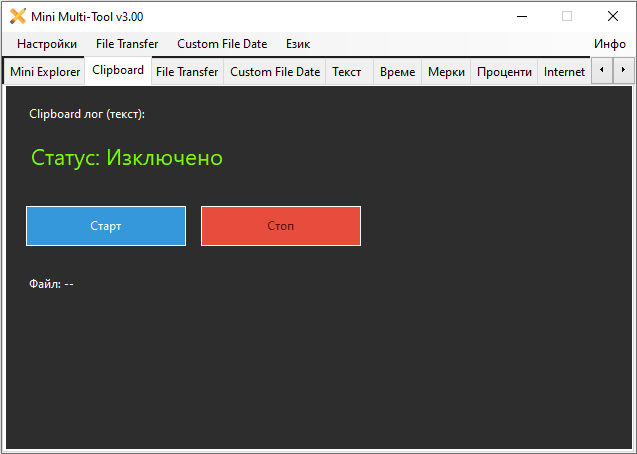 Screen BG 1
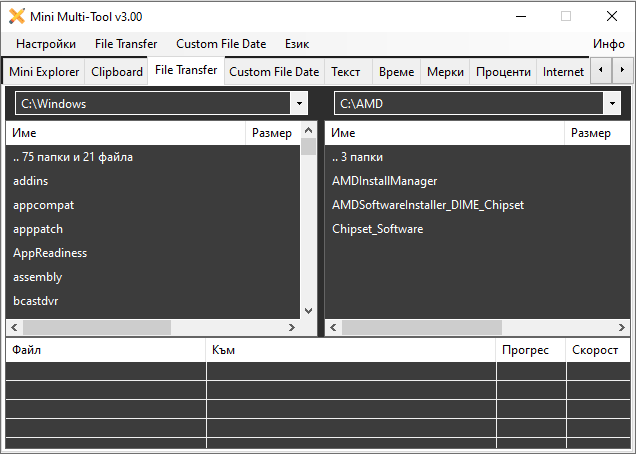 Screen BG 2
 Screen BG 3
Contact
Download
Latest version: v1.60
⬇ Download NowОписание (BG)
My site is free and does not allow me to upload large files,
so I am sharing all versions of the program in this link.
The link will be deactivated in 1-2 weeks!
The file is 47,8 MB and include:
Digital_Releaser_v1.60_win-x64_big_portable_no-dotnet.7z
Digital_Releaser_v1.60_win-x64_small_requires-dotnet8.7z
DigitalReleaserSetup.exe
Temp Download Link:
https://1fichier.com/?3uicu3w0scza1cnoku8m
If you know of a good, free file-hosting site
that keeps files for 1-2 weeks or more,
let me know so I can upload it there.
Instructions (EN)
Review by: Robert Condorache @ Softpedia
https://www.softpedia.com/get/Multimedia/Audio/Other-AUDIO-Tools/Digital-Releaser.shtml
Digital Releaser (Digital Studio) — Overview
Short description - Digital Releaser is:
MP3/FLAC Releaser, NFO Viewer/Fixer, SFV Checker/Creator/Cleaner,
MP3/FLAC codec version viewer...
Long description:
Digital Releaser is an all-in-one Windows desktop toolkit
for preparing music releases in a “scene-style” structure.
It combines a release folder/name generator, audio inspector,
NFO/INFO builder + editor, automatic file renaming/copying,
playlist + SFV generation, plus two standalone mini-apps:
an NFO Viewer and an SFV Checker/Creator.
What It’s For
- Building a correctly named release folder (artist/album/tags/group)
fast and consistently
- Scanning audio files and extracting technical + tag info (MP3/FLAC)
- Generating a formatted NFO/INFO text with tracklist, totals, sizes,
dates, etc.
- Creating the final release output: renamed files, optional cover images,
playlists, SFV checksum file, and “sidecar” files (like .log) when detected
- Handling multi-disc releases and VINYL-style naming rules
- Opening and fixing Broken NFO files (Code Page 437)
- Checking SFV integrity or creating SFV files directly from Explorer
context menu
Main Workflow (3 Steps)
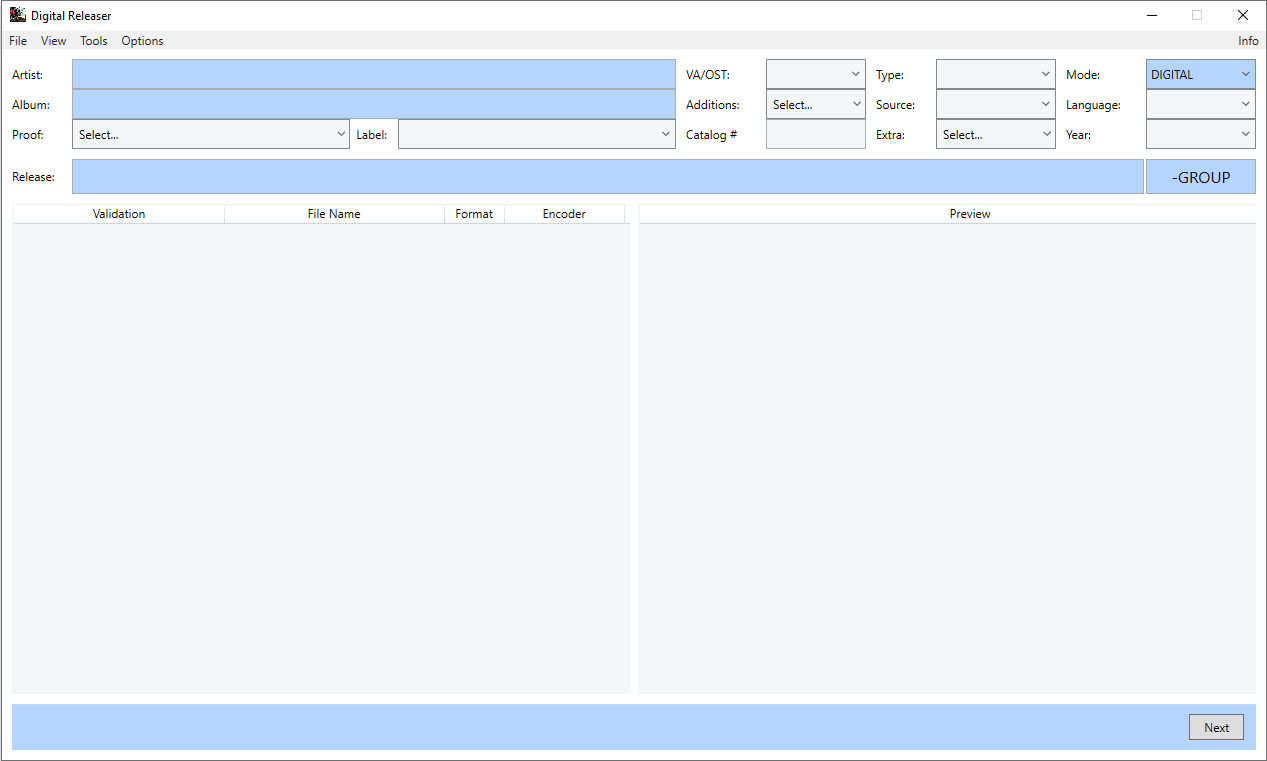
Step 1: Load files
- Open files or whole folders, or drag & drop into the file list.
- The app inspects files and shows a detailed table (format, encoder,
bitrate, sample rate, channels, bits-per-sample for FLAC, duration,
size, validation status).
- Builds an initial release name automatically from your inputs
and selections.
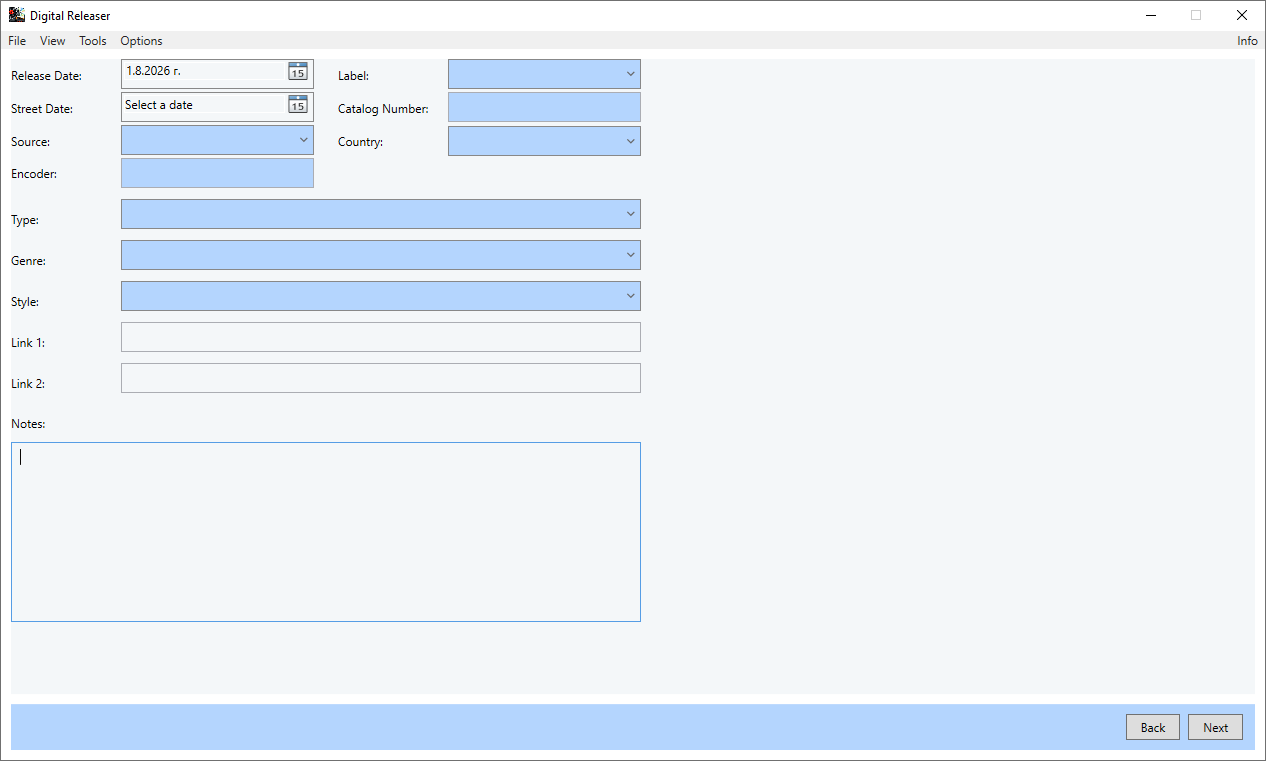
Step 2: Info Page (metadata)
- Fill in release date, street date, source, country, encoder, label,
catalog number, type/genre/style, links, notes.
- Most fields are combo-driven (fast picking), with editable/extendable lists.
Step 3: NFO / Info Preview
- Generates the final NFO/INFO text using a template.
- You can edit the preview manually before creating the release.
- “Pop-out Preview” opens a dedicated preview/editor window
for comfortable editing.
Release Naming Engine (Scene-Style)
Digital Releaser automatically builds the folder name using a structured formula:
- Artist and Album are normalized (spaces → underscores)
- Adds optional tags such as:
- Catalog number (optionally in brackets)
- Language tag (e.g. “BG”)
- Additions: INTERNAL, PROPER, REPACK, DIRFIX, NFOFIX, CUEFIX, RERIP, PROOFFIX,
TRACKFIX, READNFO, REAL PROPER, REAL REPACK, plus custom addition text
- Type tags (multi-select capable)
- Source (WEB/CD/VINYL/…)
- Disc count tags for multi-disc (e.g. 2CD, 3xLP, 2xVINYL)
- FLAC technical tags: 16BIT/24BIT, 44KHZ/48KHZ/96KHZ/…, or compact “16-44”
mode depending on setting
- Year
- Folder separator is configurable:
- Either _-_
- Or simple -
- Track filename separator is configurable:
- Either -
- Or _
- The group suffix is handled separately (e.g. -GROUP, with optional _INT behavior)
You can also manually edit the release name; the preview updates accordingly.
Release Creation (What Gets Generated)
When you click Create Release, the app creates the release folder and produces:
- Renamed + copied audio files into the new release directory
- Playlist(s) (.m3u) using the generated filenames
- NFO file (.nfo) created from the preview text (including any manual edits)
- SFV file (.sfv) with CRC32 checksums (no comment lines)
It also supports extra behaviors:
- Multi-disc output
- Disc-aware numbering (e.g. 101, 102… then 201, 202…)
- Disc playlists and a global playlist strategy (configurable)
- CUE support
- Detects and parses .cue files
- Copies the cue and rewrites the FILE "..." line to match the renamed audio
filename
- ID3/metadata extras (optional)
- Optional writing of track/disc numbering into tags:
- MP3: writes ID3v2 frames TRCK and TPOS
- FLAC: writes TRACK/DISC fields (including Xiph/Vorbis fields)
- Case control
- Option to force lowercase naming behavior for certain outputs
(including CRC format in SFV)
VINYL Mode
A special mode designed for vinyl rips and vinyl-style track naming:
- Mode switch: DIGITAL / VINYL (ANALOG)
- Enforces/validates vinyl track codes like A1, A2, B1, B2, C1, C2...
- Uses vinyl side codes as track prefixes in filenames and playlists
where appropriate
- Vinyl playlists can be:
- Separate (per side / disc logic)
- Single (one combined playlist for the whole vinyl release)
Covers System (Smart Cover Handling)
Digital Releaser can detect cover images and integrate them into
the release:
- Scans folders for .jpg/.jpeg cover candidates
- Shows a warning if covers exist but you didn’t classify them
(optional “Covers Warning” setting)
- Lets you classify images via the Proof menu as:
- Proof, Front, Back, Inside, CD, Booklet, Inlay, Digipak, Cover
- Prevents conflicts (the same image cannot be assigned to multiple
cover kinds) - Generates cover filenames in a consistent scheme, including numbering
when multiple files exist for the same kind
Playlists (Multi-Disc Logic)
For multi-disc releases the program can generate playlists in
different styles:
- Disc playlists per disc
- Global playlist behavior options:
- “Intelligent” multi .m3u (global references disc playlists)
- “Oldschool” multi .m3u (single list style)
NFO / INFO Template System
- Uses info_template.nfo from the app folder if present
- If missing, it falls back to an embedded template and can write
it out automatically
- Works in Code Page 437 so classic ASCII art renders correctly
- Template tokens get replaced (examples):
- #Artist, #Album, #Genre, #Style, #Year, #Label, #Catalog, #Country, #Source,
#Encoder, #Quality, #Tracks, #Time, #Size
- Covers and covers type fields
- Tracklist block and release notes block
- Tracklist generation is formatted to fit a fixed-width layout
(classic scene NFO style)
Built-in Tool: NFO Viewer
A standalone viewer/editor specialized for NFO files:
- Can open .nfo directly (standalone mode)
- ASCII art friendly rendering (CP437 handling)
- Optional clickable links inside NFO text:
- Detects URLs/domains and turns them into clickable links
- Optional underline toggle
- Optional “show filename in title”
- Optional “Save As… fix” button:
- Detects broken line breaks and can save a corrected copy
(useful for NFOs with bad CR/LF formatting)
- Optional custom icon support via nfo.ico
- File association tools:
- Associate / remove .nfo association
Built-in Tool: SFV Checker + SFV Creator
A standalone SFV utility inside the program:
- Open an .sfv and verify files against CRCs
- Create SFV from a folder selection
- Windows integration:
- Associate .sfv files to open in the SFV Checker
- Adds Explorer context menu action: “Create .SFV File”
(works for files/folders)
- Convenience options:
- Completion sound on/off
- Custom icon support via sfv.ico (for the window and integration)
- Show filename in title
- Auto-scroll behavior
Quality-of-Life / UI Extras
- Hide Preview toggle (cleaner workspace when needed)
- Release Dir override: force output to a chosen target directory,
independent of source location
- Separate Taskbar Apps: optional separate taskbar grouping for
the different windows/tools
- Add/Remove Fields: configurable UI behavior for managing combo options
(Type/Genre/Label/etc.)
- Settings persist in config.json in the app directory
In One Sentence
Digital Releaser is a “release factory” for music: you load your audio,
pick your tags, generate a professional scene-style NFO, and export a clean,
fully renamed, playlist + SFV verified release folder—while also having an
NFO viewer and SFV tool built directly into the same app.
Features
Screenshots
 Screen EN 1
 Screen EN 2
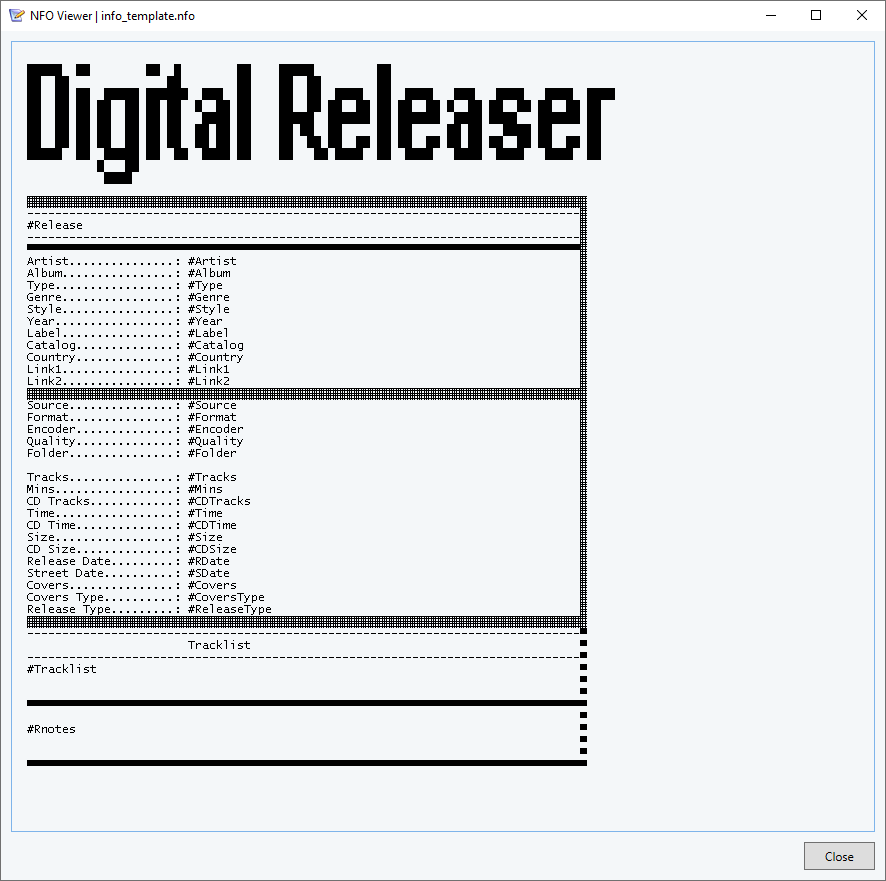 Compact Mode - Displays as text
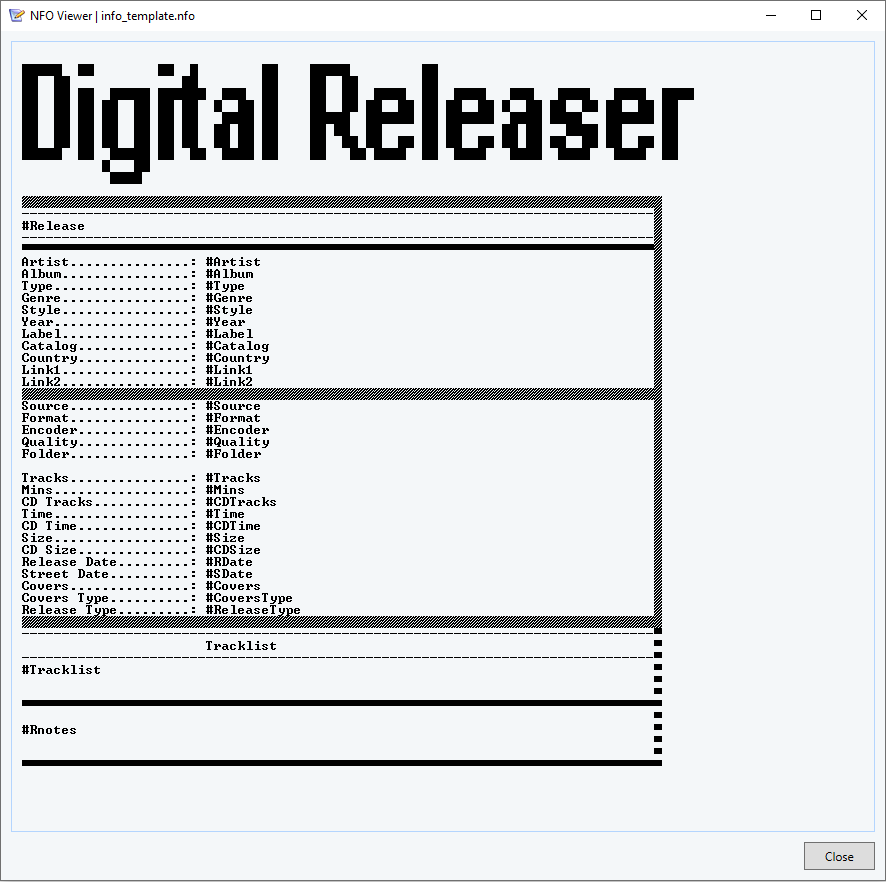 Classic Mode - Displays the text in an 80-column DOS matrix
Contact
Download
Latest version: v1.00
⬇ Download NowОписание (BG)
🇧🇬 🌙 Dream Book – Цифрово съдържание за Съновник
Енциклопедия на съновиденията и съногаданията (I и II том) – Олег Младенов
Издадена: 2011, Труд / КНИГАТА, www.knigatabg.com
📖 За какво служи програмата?
Физическото двутомно издание на
„Съновник – Енциклопедия на съновиденията и съногаданията“ от Олег Младенов
е монументален труд от 2 тома и над 1700 страници, съдържащ десетки хиляди
тълкувания и символи.
Когато се събудите и помните няколко различни символа от съня си, ръчното
разлистване и лутане из 1700+ страници може да отнеме много време.
Dream Book е вашият бърз цифров указател и спътник за физическата книга!
С него намирате точния ТОМ и СТРАНИЦА за секунди – записвате всички
сънувани символи на едно място и просто отваряте книгата директно
на готовите страници.
✨ Основни възможности и предимства:
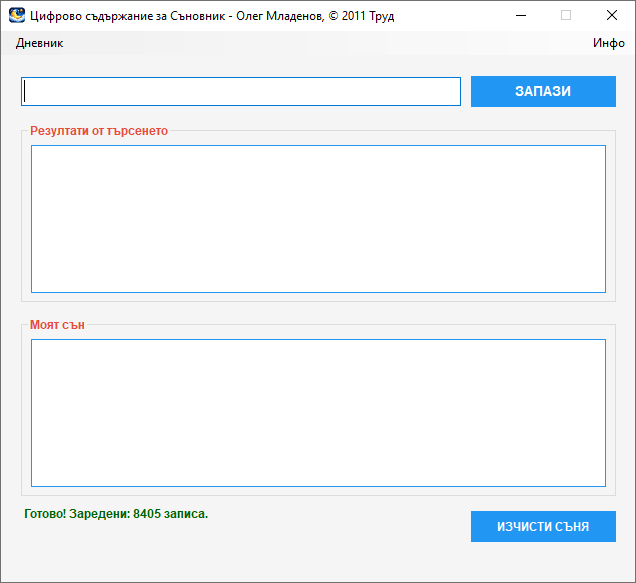
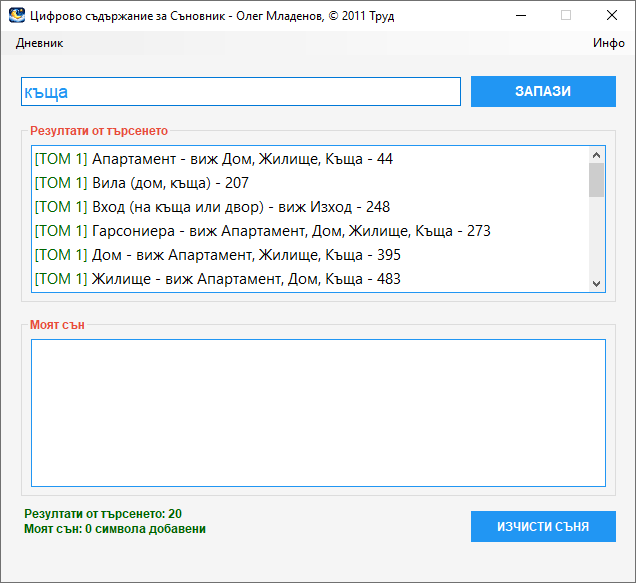
⚡ Светкавично търсене в реално време (Live Search):
Резултатите се филтрират мигновено още докато изписвате думата.
📚 Пълно двутомно покритие:
Всяка намерена дума ясно показва тома и страницата във физическото издание.
🌙 Списък „Моят сън“:
Сънували сте звезда, луна и гора в една нощ? Добавете ги всички с един клик
в общ списък. Така имате готов план и разлиствате книгата за секунди!
⭐ Дневник „Често сънувани“:
Специално меню за лесно запазване и бърз достъп до вашите любими и повтарящи се символи.
💻 Компактна и без нужда от инсталация:
Лек софтуер, който не товари компютъра, работи офлайн и не изисква сложни бази данни.
🎁 100% Безплатен софтуер (Freeware):
Напълно свободен за лична употреба.
Instructions (EN)
🇺🇸 N/A
Features
- ОС: Windows 10 / Windows 11
- Платформа: .NET 8.0 Runtime
Screenshots
 (DreamBook1)
 (DreamBook2)
Contact
Email: Moriya123@protonmail.com | YouTube: @3 Stars
Download
Latest version: v1.00
⬇ Download NowОписание (BG)
🇧🇬 Бързо, лесно и умно откриване на филми за всяка киновечер – без безкрайно
скролване и чудене какво да гледате!
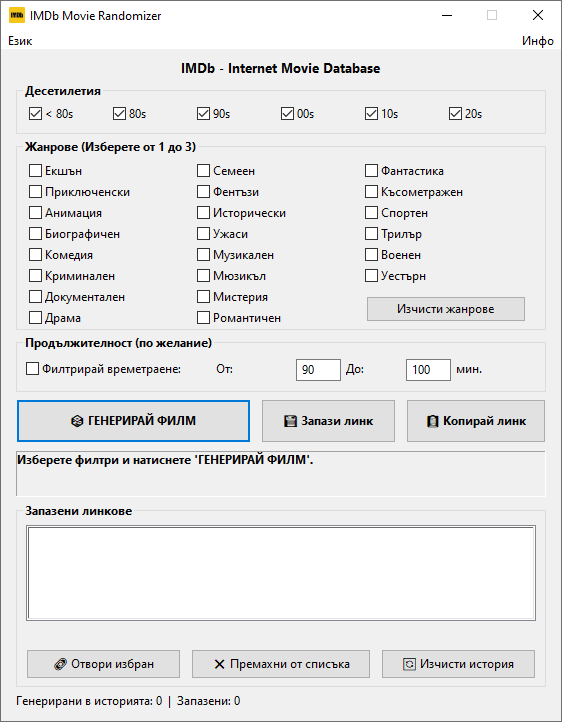
IMDb Movie Randomizer е безплатен и изключително лек софтуер за Windows,
който ви помага да откриете следващия си любим филм само с едно натискане
на бутона. С богата вградена база данни и интелигентни филтри, програмата избира
перфектното заглавие според вашето настроение и веднага отваря страницата му в IMDb.
✨ Основни възможности:
🎲 Генериране с 1 клик: Изберете период, жанрове и желана продължителност –
получавате мигновено филмово предложение.
📚 Богата вградена база данни.
🚫 Защита от повторения: Автоматична история, която гарантира, че никога
няма да ви се падне филм, който вече сте генерирали.
🇧🇬 Официални български заглавия: Показва точните български имена на филмите,
извлечени от официалната база на IMDb.
🎯 Прецизни филтри:
• Десетилетия: от класики преди 80-те до най-новите заглавия от 2020+.
• 22 Жанра: възможност за комбиниране на до 3 жанра едновременно.
• Времетраене: филтриране по точни минути (напр. от 90 до 110 мин.).
⭐ Списък със запазени (Любими): Запазвайте си интересни заглавия за по-късно
и ги отваряйте директно от списъка.
🌍 17 Езика: Пълен многоезичен интерфейс с локализирани заглавия за всяка държава.
⚡ Супер лек и преносим (Portable): Написан на чист C++ Win32 — без излишни
библиотеки, стартира светкавично и не изисква инсталация.
Instructions (EN)
🇺🇸 Instantly find your next movie night pick without the hassle of endless scrolling!
IMDb Movie Randomizer is a lightweight, portable Windows application designed
to end movie-night indecision. With an extensive embedded offline database
and powerful filtering options, it instantly delivers tailored movie recommendations
and opens them directly on IMDb with a single click.
✨ Key Features:
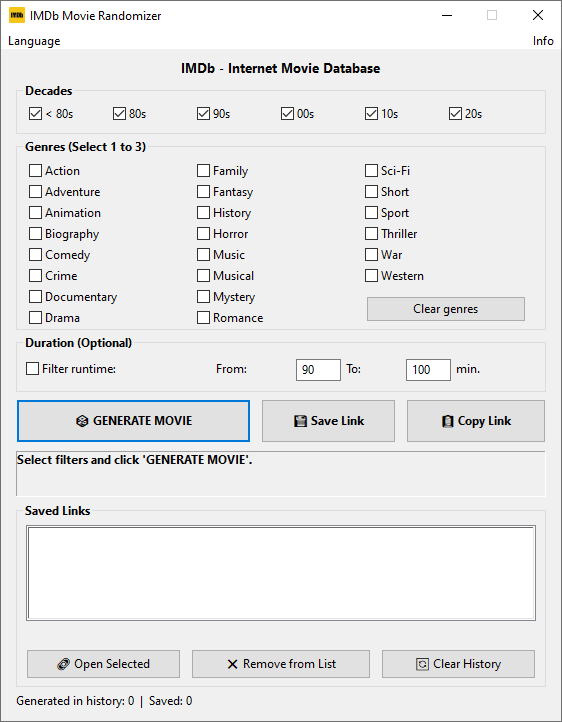
🎲 1-Click Movie Discovery: Pick your preferred decade, genres, and duration —
get an instant recommendation linked directly to IMDb.
📚 Embedded Offline Database.
🚫 Zero-Repetition Tracking: Built-in smart history tracker ensures you never
receive the same movie suggestion twice.
🌐 17 Languages & Official AKAs: Displays official localized movie titles
in your language using IMDb and Wikidata records.
🎯 Smart & Flexible Filters:
• Decades: From pre-1980 classics all the way to 2020+ releases.
• 22 Genres: Combine up to 3 genres simultaneously for pinpoint results.
• Runtime Filter: Set exact minimum and maximum movie duration
(e.g., 90 to 110 mins).
⭐ Saved Links (Favorites): Bookmark your favorite generated picks into a personal
watchlist and manage them easily.
⚡ Ultra-Light & Native: Built with pure C++ Win32 API — zero bloat, instant startup,
minimal memory usage, and 100% portable (no installation required).
Features
- Windows 7 / 8 / 10 / 11 (64-bit)
Screenshots
 (EN)
 (BG)
Contact
Email: Moriya123@protonmail.com | YouTube: @3 Stars
Download Game
Latest version: v2.1
⬇ Download NowОписание на играта (BG)
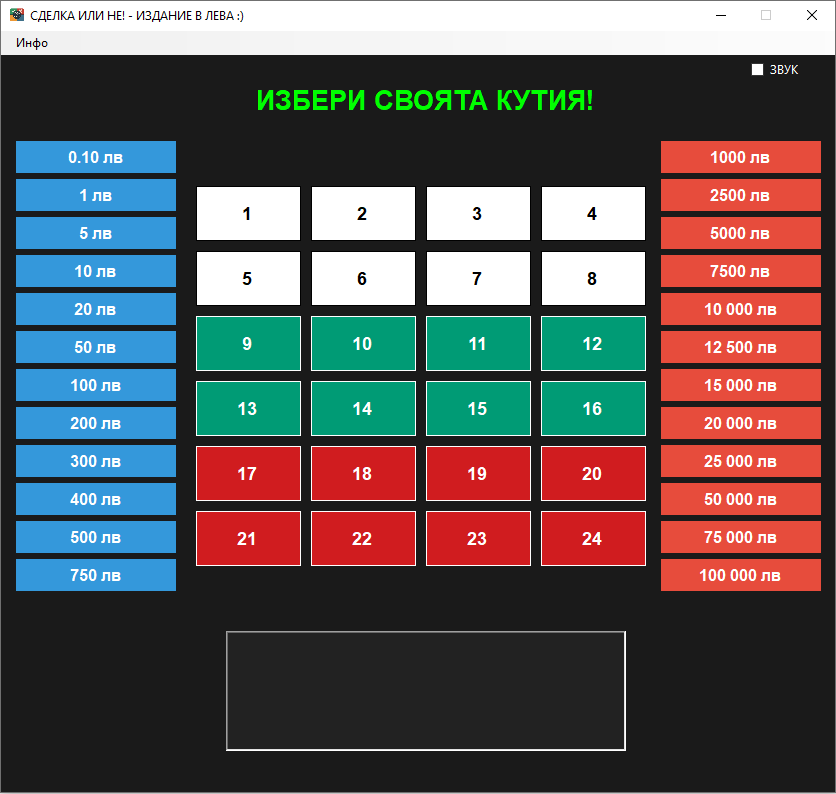
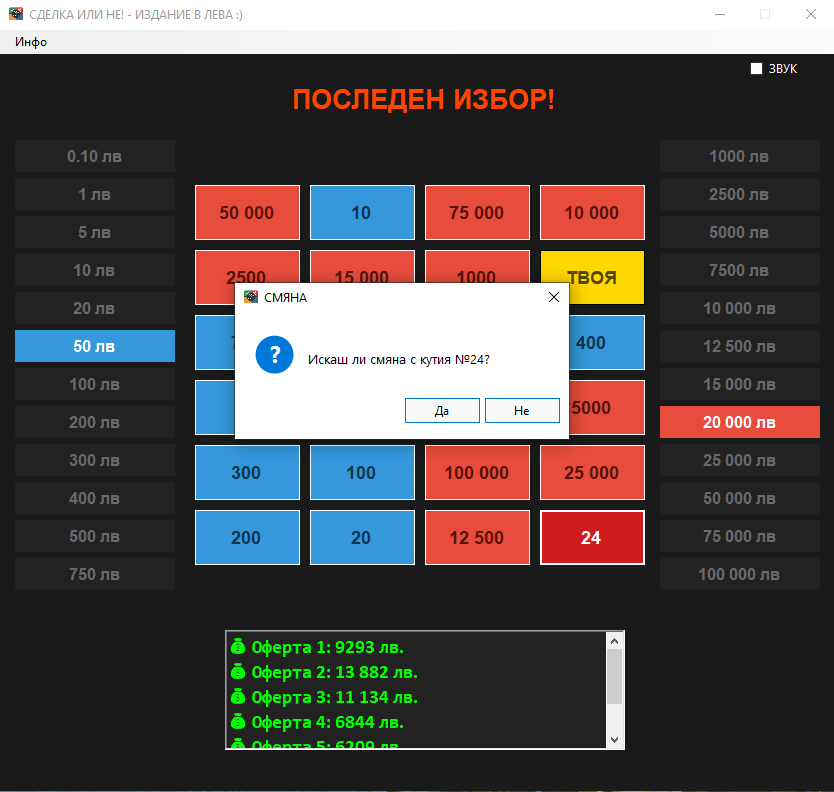
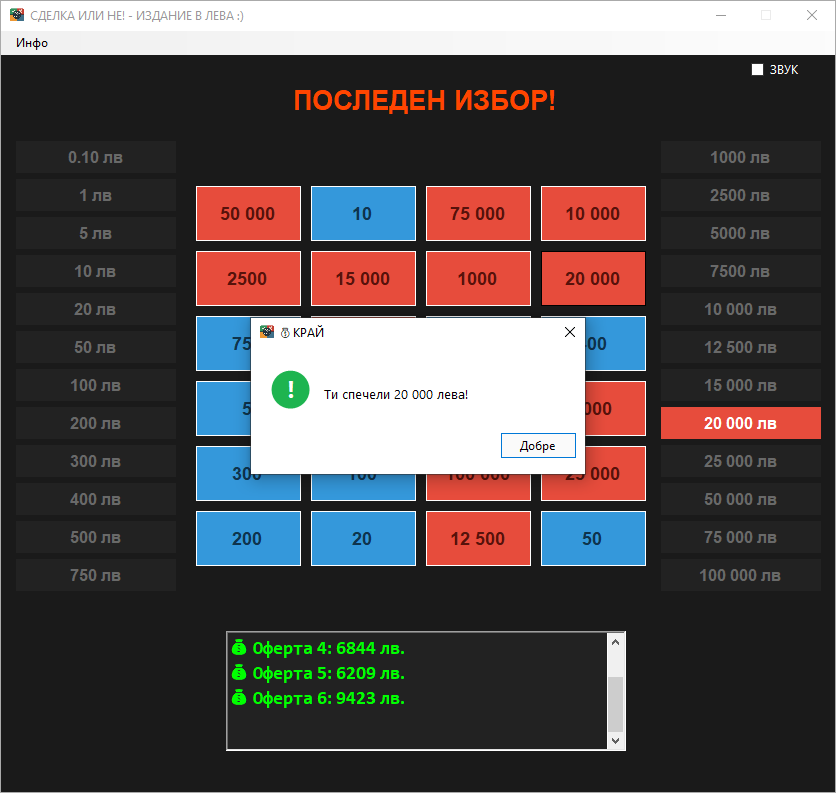
Сделка или не - класическата игра с кутии. Няма нужда от представяне.
Game Instructions (EN)
🇺🇸 Deal Or No Deal - Face the Banker and make the right choice!
Screenshots (Game)
 Gameplay 1
 Gameplay 2
 Gameplay 3
Contact
Email: Moriya123@protonmail.com | YouTube: @3 Stars